



MES Software: Vendors, Features & Costs Compared 2026
MES software compared: vendors, functions per VDI 5600, costs (cloud vs. on-premise) and implementation. Honest market overview 2026.
Alarm management in manufacturing is the systematic process of capturing, analyzing, prioritizing, and acting on machine alarms to reduce unplanned downtime, improve availability, and identify root causes of production losses. Without a structured alarm management system, these alarms are invisible to everyone except the operator standing at the machine at that moment.
In discrete manufacturing, alarm management means: every PLC alarm is captured automatically, transmitted to the MES, recorded with timestamp and duration, ranked by frequency and impact, correlated with downtime events, and used to drive systematic improvement actions. The goal is not to eliminate all alarms. The goal is to understand which alarms matter, why they occur, and what to do about the ones that cause the most production loss.
SYMESTIC provides a dedicated Alarms product module that captures PLC alarms via OPC UA or digital alarm signals, displays them in real time on the Alarm Monitor, ranks them by frequency and duration in the Alarm Ranking, and analyzes patterns and correlations in the Alarm Analyzer.
Every machine alarm represents an event in the production process: a safety interlock triggered, a sensor detected an out-of-range value, a material feed jammed, a temperature exceeded a threshold, a pneumatic cylinder did not reach its end position. Some alarms stop the machine immediately. Others are warnings that do not stop production but indicate a developing problem.
| Alarm type | What it means | Impact on production | Example |
|---|---|---|---|
| Machine stop alarm | A condition has been detected that requires the machine to stop immediately. The PLC halts the production cycle. | Immediate downtime. Machine cannot produce until the alarm is acknowledged and the root cause is resolved. | Safety door opened during cycle. Emergency stop pressed. Motor overload detected. Pneumatic pressure below minimum. |
| Warning alarm | A condition has been detected that does not require an immediate stop but indicates a developing problem. | No immediate downtime, but if ignored, the condition may escalate to a stop alarm. Potential quality impact. | Temperature approaching upper limit. Lubricant level low. Cycle time exceeding target. Vibration level increasing. |
| Informational alarm | A status change has occurred that the PLC records for documentation purposes. | No production impact. Used for logging and traceability. | Mode change (automatic to manual). Tool change completed. Batch counter reached target. Maintenance interval reached. |
| Nuisance alarm (chattering) | An alarm that triggers repeatedly in rapid succession without corresponding to a real production problem. | Alarm fatigue. Operators begin to ignore alarms because too many are meaningless. Real problems get missed. | A sensor with a marginal signal triggers the same alarm 50 times in one hour. Each occurrence lasts less than 2 seconds. |
The critical problem in most factories is not a lack of alarms. It is the opposite: too many alarms, with no way to distinguish the important ones from the noise. Without an alarm management system, this data is lost inside the PLC or scrolls past on a local HMI screen that no one reviews.
| Capture method | How it works | Data captured | Machine requirement |
|---|---|---|---|
| OPC UA alarm subscription | The IoT gateway subscribes to the PLC's OPC UA alarm server. When an alarm fires or clears, the gateway receives the event in real time and transmits it to the cloud MES. | Alarm code, alarm text, alarm category, start time, end time, duration, alarm priority, associated machine/station. | Modern PLC with OPC UA server and alarm functionality exposed (Siemens S7-1500, Beckhoff TwinCAT, etc.). |
| Digital alarm signals | A digital I/O gateway captures one or more dedicated alarm signals (24V) from the machine. Each signal represents a general alarm state (machine in alarm / not in alarm). | Alarm state (active/inactive), start time, end time, duration. No individual alarm code. Sufficient for downtime classification. | Any machine with a 24V alarm output signal. No digital interface required. Works with legacy machines from the 1990s. |
At Klocke, digital I/O gateways capture basic machine states including alarm signals. The capture method is chosen based on the machine's capabilities: OPC UA for modern PLCs, digital signals for legacy machines.
Capturing alarms is only the first step. The value of alarm management comes from analysis: understanding which alarms cause the most production loss and why.
| Analysis type | What it shows | How it is used |
|---|---|---|
| Alarm Pareto (Top 10) | The alarms ranked by total frequency and total duration over a selected time period. Shows which alarms occur most often and which alarms consume the most production time. | Maintenance and engineering focus on the top 3 to 5 alarms. Systematic elimination starts with the alarm that causes the most cumulative downtime. |
| Alarm-downtime correlation | Links each alarm event to the resulting downtime duration. Distinguishes between alarms that stop the machine (downtime-causing) and alarms that are warnings only. | Identifies which specific alarms are responsible for the highest percentage of unplanned downtime. Drives targeted maintenance actions. |
| Alarm timeline | Chronological view of all alarms on a machine over a time period. Shows alarm sequences, overlapping alarms, and alarm cascades. | Helps identify root cause vs. symptom. When 5 alarms fire within 2 seconds, the first alarm is likely the root cause and the others are consequential. |
Alarm management directly impacts all three factors of OEE (Overall Equipment Effectiveness):
| OEE factor | How alarm management helps |
|---|---|
| Availability | Machine stop alarms are the direct cause of unplanned downtime. Alarm Pareto identifies the most frequent stop alarms. Systematic elimination of top alarm causes reduces total unplanned downtime. Alarm notification ensures faster maintenance response. |
| Performance | Short alarms (micro-stops) that last only seconds but occur hundreds of times per shift reduce effective cycle time. These are invisible to operators but captured by the alarm system. Alarm analysis reveals the cumulative impact of micro-stops. |
Capturing and analyzing alarms creates historical insights. But alarm management also has a real-time function: notifying the right people immediately when critical alarms occur.
| Function | How it works | Benefit |
|---|---|---|
| Real-time alarm notification | When a machine alarm fires, the MES sends a notification (email, push notification) to the responsible maintenance technician or production manager within seconds. | Maintenance response time drops from minutes or hours (operator walks to find technician) to seconds (notification arrives on phone). |
| Alarm Monitor (dashboard) | A real-time dashboard showing all active alarms across all machines in the plant. Color-coded by priority. Visible on shopfloor TV screens, office monitors, and mobile devices. | Plant-wide alarm visibility. Production managers see the alarm status of all machines on one screen instead of walking to each machine's HMI. |
| Automatic downtime classification | When a machine stops and a PLC alarm is active, the MES automatically classifies the downtime reason based on the alarm code. No manual input by the operator required. | Eliminates manual downtime logging. Downtime reasons are objective and consistent. |
| Dimension | Manual (without MES) | MES-based alarm management |
|---|---|---|
| Alarm visibility | Alarms are only visible on the local HMI of the machine. Only the operator at the machine sees them. Once acknowledged, the alarm history scrolls away. | All alarms are captured centrally, visible on dashboards, and stored permanently. Every alarm from every machine is accessible for analysis. |
| Alarm history | PLC alarm buffers are limited. Older alarms are overwritten. No long-term alarm history available for analysis. | Complete alarm history stored in the cloud. Months or years of alarm data available for trend analysis and pattern recognition. |
| Alarm ranking | Not available. No way to determine which alarms occur most frequently or cause the most downtime without manual counting. | Automatic Alarm Pareto: top alarms ranked by frequency and duration. Available per machine, per line, per plant, per time period. |
| Correlation analysis | Not possible. No way to correlate alarms with quality defects or downtime patterns without manual data compilation. | Automatic alarm-downtime correlation. Hidden connections between machine events and production losses become visible. |
| Notification | Operator must walk to find maintenance. Or call by phone. Delay of minutes to hours. No escalation mechanism. | Automatic notification to maintenance within seconds. Every critical alarm reaches the right person. |
What is alarm fatigue and how does alarm management address it?
Alarm fatigue occurs when operators are exposed to so many alarms that they begin to ignore them, including critical ones. This happens when alarm systems are not properly configured: too many nuisance alarms, chattering alarms (the same alarm firing and clearing repeatedly), and informational alarms mixed with critical ones. Alarm management addresses this through alarm Pareto analysis (identifying nuisance alarms for elimination), alarm prioritization (distinguishing critical from informational), and alarm rationalization (reviewing whether each alarm serves a purpose and requires operator action).
Can alarms be captured from old machines without OPC UA?
Yes. For machines without OPC UA but with Ethernet, alarms can be read directly from PLC registers. For machines without any digital interface, a digital I/O gateway can capture a general alarm signal (24V). This provides basic alarm state information (machine in alarm / not in alarm) with timestamp and duration. At Klocke, SYMESTIC uses digital I/O gateways on packaging lines with no LAN infrastructure (LTE connectivity only).
How does alarm management relate to downtime analysis?
Alarm management and downtime analysis are complementary. Downtime analysis answers: how long was the machine stopped? Alarm management answers: why did the machine stop? When PLC alarms are captured, the MES can automatically classify each downtime event with the alarm code that was active at the time of the stop. This eliminates manual downtime reason entry and provides objective, consistent downtime classification.
Is alarm management part of an MES or part of SCADA?
Both. SCADA systems handle alarm management at the process control level: displaying alarms on the HMI, allowing operators to acknowledge alarms, and controlling alarm suppression during startup/shutdown. An MES handles alarm management at the production management level: capturing alarms from all machines centrally, storing long-term alarm history, performing alarm Pareto and correlation analysis, sending notifications, and linking alarms to downtime events. In many factories, SCADA handles the real-time alarm display at the machine while MES provides the plant-wide alarm analytics.
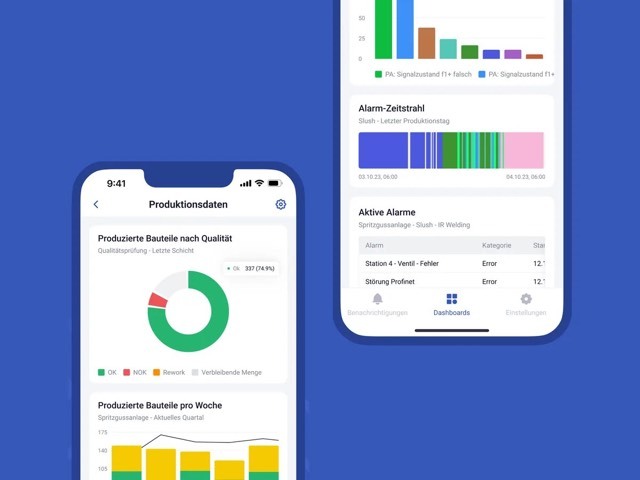
Machines report plenty. Which alarm actually stopped the line, nobody can say afterwards.
See machine alarms centrally and trace them to the cause
SYMESTIC collects the alarms of all machines in one place and puts them next to the downtime. When a condition you set is met, you get a push or email notification.
MES software compared: vendors, functions per VDI 5600, costs (cloud vs. on-premise) and implementation. Honest market overview 2026.
OEE software captures availability, performance & quality automatically in real time. Vendor comparison, costs & case studies.
MES (Manufacturing Execution System): Functions per VDI 5600, architectures, costs and real-world results. With implementation data from 15,000+ machines.