



Contents
Virtual manufacturing is the use of computer models to simulate manufacturing processes, equipment and their interactions before they run physically. Dépincé, Chablat and Woelk define the research area as an integrated manufacturing environment that can enhance one or several levels of decision and control in the manufacturing process. The NIST MEP guide to Industry 4.0 technologies describes the practical side: simulation creates virtual representations of a part or process, so improvement ideas can be validated without impacting current production. A model answers the question and the assumptions built into it, and its result applies to those only.
Virtual Manufacturing and the Digital Twin
A digital twin is a related idea with a different data link. NIST IR 8356 (2025) states that there is no agreed definition and quotes the Digital Twin Consortium: a virtual representation of real-world entities and processes, synchronized at a specified frequency and fidelity. NIST sees the advance over traditional simulation in real-time monitoring while the twin is updated dynamically.
| Aspect | Offline Simulation Model | Digital Twin (NIST IR 8356) |
|---|---|---|
| Data link | Fixed inputs from a chosen period | Synchronized with the real entity at a specified frequency and fidelity |
| Typical question | What happens if we change the layout, buffer or rule? | What is the current state, and what does the twin predict from real-time and historical data? |
The buffer model below has fixed inputs and no live connection to the line, so it is a simulation model in the sense of the left column.
Choose the Question Before the Software
A question about a queue needs a different model from a question about tool forces. For the queue, processing times, interruptions and transfer rules are central. For the tool, material and physical process behavior matter more.
| Question | Model Needs | Result to Check |
|---|---|---|
| Will a buffer protect the next station? | Rates, interruption timing and usable buffer | Starvation time at the downstream station |
| Will a new layout shorten delivery? | Routes, handling and queue rules | Lead time at the stated demand mix |
| Will a machining change work? | Relevant physical process model | Agreement with suitable tests |
| Will systems exchange data correctly? | Messages, states and recovery cases | End-to-end behavior under the defined faults |
One model can combine several of these levels, but every extra level needs its own data and verification. Visual detail that does not affect the decision draws attention away from the assumption nobody has tested.
Estimate Buffer Coverage Before Simulating It
Example: an assembly station takes one part every 30 seconds from a buffer that holds 20 usable parts. If the upstream supply stops and assembly continues at that constant rate, a full buffer covers 20 × 30 = 600 seconds, or 10 minutes. An upstream interruption of 15 minutes leaves 5 minutes without supply.
| Buffer at Start of Interruption | Coverage | Starvation in a 15-Minute Interruption |
|---|---|---|
| 20 parts (full) | 10 min | 5 min |
| 8 parts | 4 min | 11 min |
| 0 parts (empty) | 0 min | 15 min |
The calculation assumes every buffered part is usable and assembly has no other interruption. It is a boundary check, not a stochastic simulation. The same physical buffer protects the station for 10, 4 or 0 minutes depending on its level when the interruption starts. A model that resets the buffer to full before every test run would hide that dependence, so the starting level is an input to record.
Verify the Logic and Validate the Representation
Robert Sargent's paper on verification and validation of simulation models (2005) uses two definitions. Verification means ensuring that the computer program of the model and its implementation are correct. Validation means showing that the model, within its domain of applicability, is accurate enough for its intended application, and validity has to be shown for each question the model is meant to answer.
For the buffer, verification checks that each completed assembly consumes exactly one part and that the queue never exceeds 20. Wrong counting is a model defect, whatever the input data. Validation reproduces a known operating period with the real product mix and starting level and compares the result at the same boundary before the model supports an investment decision.
When failures or arrival times are random, compare repeated runs instead of one attractive result. Document how the warm-up period and the random inputs are handled, and present the spread that matters for the decision rather than one precise average.
Choose Data That Matches the Model Boundary
A cycle-time average may already contain waiting or short interruptions. Adding separate waiting and stop processes to the same figure counts those losses twice. Define whether an input is an uninterrupted processing time or an observed elapsed time.
Record source, period and filtering for each input. A short run on one product may not represent a mixed shift. If the decision changes when a plausible assumption changes, show that sensitivity and name the information needed to narrow it.
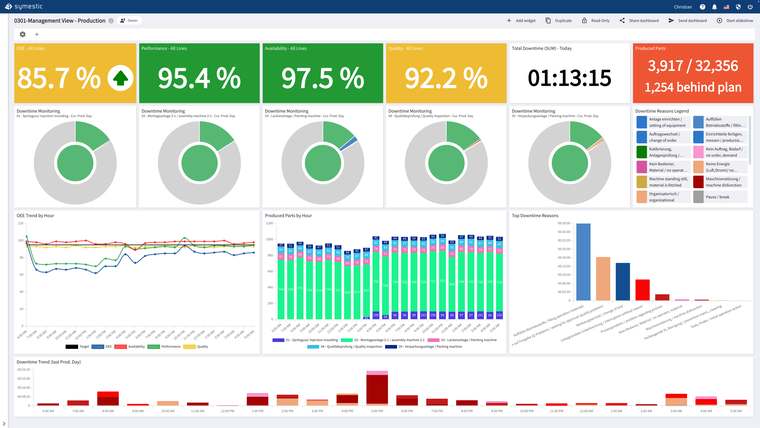
SYMESTIC, a cloud MES, records quantities, cycle times and stop durations with their reasons per machine and keeps the history. These records can serve as model inputs once you have checked what each figure includes. The process plan supplies the intended route that the model represents.
Sources
- Dépincé, Chablat and Woelk (CIRP Design Seminar 2004): Virtual Manufacturing: Tools for improving Design and Production
- NIST MEP: Manufacturers’ Guide to Industry 4.0 Technologies
- NIST IR 8356 (Voas et al., February 2025): Security and Trust Considerations for Digital Twin Technology
- Sargent (2005), Winter Simulation Conference: Verification and Validation of Simulation Models

See recorded cycle times and stop durations per machine, the inputs a buffer model needs, in a free 30-minute live demo using your own application.
See SYMESTIC on your own use case
In a free live demo, a product expert walks you through the running platform and shows what OEE, downtime and the connection of your machines and ERP look like in practice.
- Live OEE
- Downtime and reasons
- Connecting machines and ERP