



TEMPLATE
Machine list template for machine connectivity
List your machines as the basis for a conversation about connectivity and a quote.
Download the template
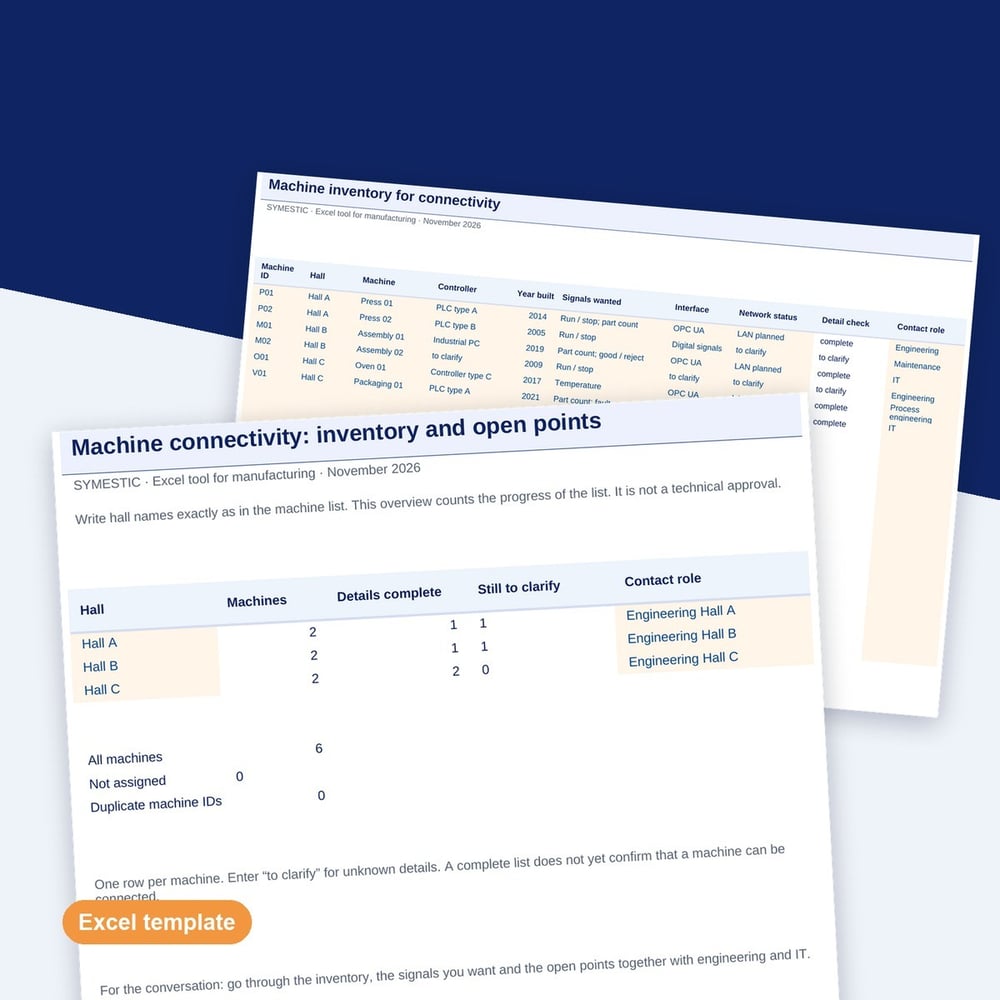
What is in the template
The completed list is a basis for discussion. The technical suitability of each interface is checked separately.
- Machines, controllers and year of manufacture per hall
- Signals, interfaces and network status
- Overview per hall with open points to clarify
Who it is for
Who the machine list template is for
The template is for production managers, maintenance teams and IT staff who want to record their machine park before they discuss connecting it to an MES. It helps most in plants that grew over time, where machines from different makers and years with different control systems stand side by side.
How to work with the machine list template
- 1
Record the machines
Give each machine a unique ID and enter hall, name, control system and year of build.
- 2
Note the signals you want
Record which values you want to analyze, for example run and stop or the part count, and which interface the machine has.
- 3
Clarify the network with IT
Check reachability and approvals with your IT and mark anything unknown as to be clarified.
What makes a good machine list
The goal defines the signals
For downtime analysis, a run and stop signal is enough; for OEE, count and scrap come on top. Deriving the signals from the goal avoids connecting more than needed.
The control system defines the path
A control with OPC UA delivers values directly. Older machines without an interface report run and cycle via digital signals. This entry sets the effort per machine.
To be clarified is a valid answer
A row with open points is worth more than an estimated entry. Engineering and IT can then clarify the open points in a targeted way.
How to
What a machine list for machine connectivity contains
A machine list for connectivity records for each machine what is needed to connect it: a unique ID, location, manufacturer and type, year of build, control system with version, available interfaces, network access and the signals you want to collect. With this list, IT, maintenance and a vendor can estimate the effort per machine before anyone visits the plant.
Find the control details on the type plate of the control cabinet, on the info screen of the HMI or in the machine documentation. Write them down as precisely as possible, for example Siemens S7-1500 with firmware version or Fanuc 0i-F, rather than just PLC. Control type and version decide whether OPC UA, MTConnect or a vendor specific interface is available.
Go through the plant hall by hall and photograph type plates and control cabinets as you go. The photos answer many questions later without a second walk. Note machines that are due to be replaced or moved, because they change the plan. Mark machines whose control the machine builder has locked, since access may need the builder's approval.
Example
Example: three machines from one hall
Sample rows from hall 1:
| ID | Machine | Control | Interface | Signals wanted |
|---|---|---|---|---|
| H1-03 | CNC lathe, 2019 | Fanuc 0i-F | Ethernet, FOCAS | status, part count |
| H1-07 | Injection molding machine, 2008 | proprietary | none known | run, stop, cycles |
| H1-12 | Assembly station, 2022 | Siemens S7-1500 | OPC UA | status, count, scrap |
The assembly station and the lathe can deliver data through their controls. The 2008 molding machine needs a different path, so it gets the note to be clarified and goes on the list for a site visit.
Questions and answers
Common questions about machine lists
What is the difference between a machine list and an equipment inventory?
An equipment inventory tracks assets for accounting and maintenance: serial number, purchase date, value, location and condition. A machine list for connectivity adds the technical details needed to read data from a machine: control system, interfaces, network and signals. You can start from your inventory and add the connectivity columns.
What is OPC UA?
OPC UA is an open, vendor independent standard for exchanging data between machines and IT systems, published as IEC 62541. Many newer controls offer an OPC UA server, built in or as an option. If the list shows OPC UA for a machine, check whether the option is licensed and activated, because it is not always active by default.
What is MTConnect?
MTConnect is an open standard for reading data from machine tools and is widespread in North America. It defines a common vocabulary for status, spindle speed, part count and alarms. Adapters exist for many CNC controls. Note in the machine list whether an adapter is installed or would have to be added.
Who should fill in the machine list?
Maintenance knows the machines and controls, IT knows the network, and production knows which machines matter most. Let maintenance start the list, IT add the network columns and production set the order in which machines are connected. One person owns the file and resolves conflicting entries.
How detailed does the first version need to be?
Detailed enough for a first estimate. ID, location, control type and whether the machine is on the network already allow a rough plan. Firmware versions, network addresses and port approvals can follow for the machines in the first project phase.
Further reading
Download the machine list template
Fill in the short form and you receive the download right after.