



TEMPLATE
Production planning template for Excel
Plan your week per machine and see where orders need more hours than are available.
Download the template
What is in the template
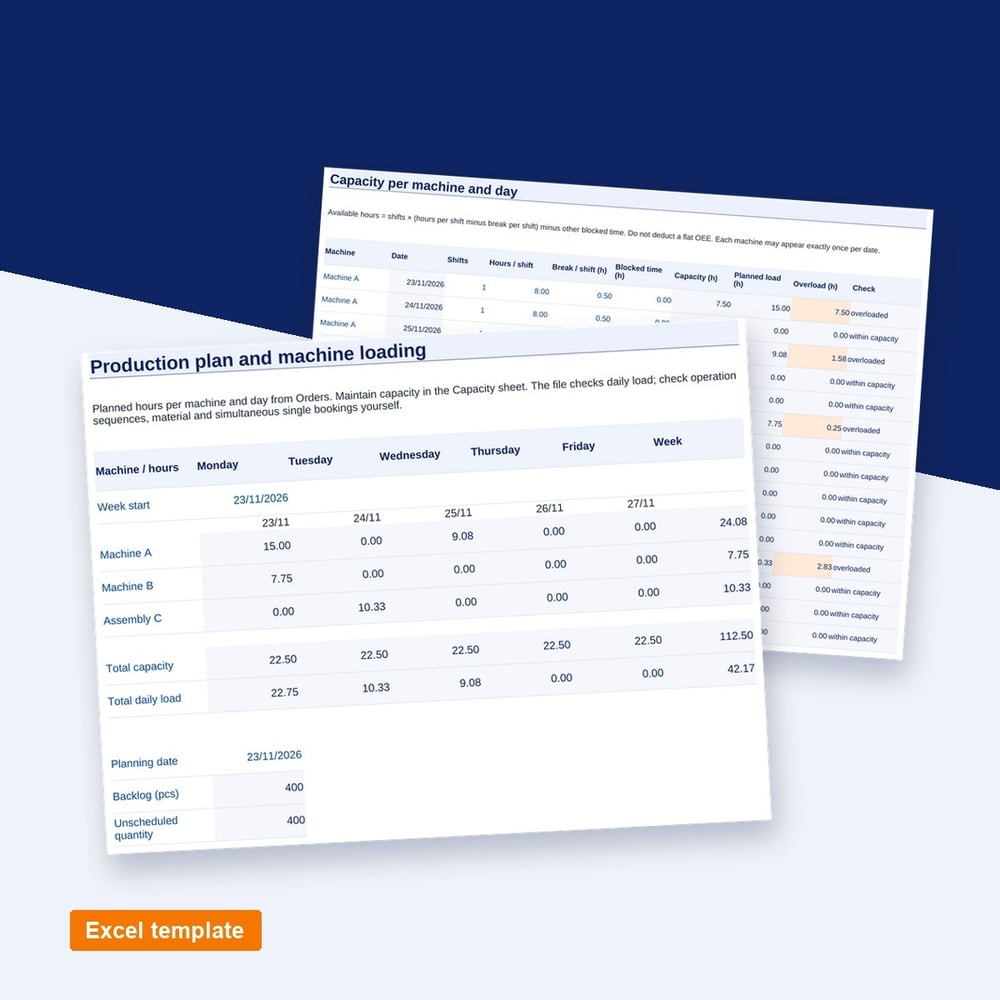
You enter quantity, completed quantity, cycle time and remaining setup time. Excel calculates the remaining hours and compares them with daily capacity. You set the planning date yourself.
- Weekly loading for three machines from your order list
- Capacity per machine and day with shifts, breaks and blocked time
- Open quantities, overdue orders and overload in hours
Who it is for
Who the production planning template is for
The template is for production planners, schedulers and production managers who plan a week of orders on a few machines in Excel. It helps to see before release on which day a machine needs more hours than it has and which orders miss their delivery date.
How to work with the production planning template
- 1
Set week and cutoff
Enter the start of the week and the planning cutoff from which the backlog is counted.
- 2
Maintain capacity per day
Record shifts, hours per shift, breaks and blocked times for each machine and day.
- 3
Schedule the orders
Assign each order to a machine and a planned day and check delivery date and schedule status.
What counts in weekly planning in Excel
Plan with the remaining load
An order that is half finished only needs the open quantity times cycle time plus the remaining setup. Planning with the full order quantity shows overload that does not exist.
Flat allowances hide bottlenecks
A flat OEE deduction spreads losses evenly across all days. Breaks and blocked times per day show on which day capacity is actually short.
Current quantities make the plan reliable
The plan is only as accurate as the finished quantity entered. When it is updated once a day, the file works with the previous day until then.
How to
How to plan a production week in Excel
A weekly production plan in Excel answers one question per machine and day: does the planned work fit into the available hours? You need four lists for it: open orders with quantity and due date, cycle and setup times per item, a capacity calendar per machine, and the assignment of each order to a machine and a day.
Plan in a fixed order. First set the capacity calendar, including maintenance windows and holidays. Then sort the open orders by due date and assign them, starting with the bottleneck machine, because it limits what the other machines can deliver. Finally go through the days with overload and move orders to another day, another machine or overtime before you release the plan to the shop floor.
Excel reaches its limits when orders pass through several machines in sequence, when setup times depend on the order sequence, or when several planners work in the same file. For a weekly plan on a few machines, it works well. Keep one person responsible for the file and save a copy at every release, so you can see later what was planned and what changed.
Example
Example: Wednesday load on three machines
Each machine runs two shifts of 8 hours with 1 hour of breaks in total, which leaves 15 hours of capacity per day. Sample load for one Wednesday:
| Machine | Capacity (h) | Load (h) | Utilization | Status |
|---|---|---|---|---|
| CNC 1 | 15.0 | 13.5 | 90% | ok |
| CNC 2 | 15.0 | 17.2 | 115% | overload |
| Saw | 15.0 | 6.0 | 40% | ok |
CNC 2 has 2.2 hours too much on Wednesday. Moving one order of about 2.5 hours to Tuesday, where CNC 2 still has free hours, removes the overload before the plan is released. CNC 1 would not help, because it only has 1.5 hours left.
Questions and answers
Common questions about production planning in Excel
What is the difference between a production plan and a production schedule?
The production plan sets which quantities are made in which week or month, based on demand and capacity. The production schedule assigns orders to machines, days and often hours and sets their sequence. A weekly plan per machine and day sits between the two and checks whether the week is feasible.
How do you calculate machine capacity per day?
Multiply the number of shifts by the hours per shift and subtract breaks and blocked time, such as planned maintenance or cleaning. Two shifts of 8 hours with 30 minutes of break each give 15 hours. Days without a shift get zero capacity, so no order lands on a holiday by mistake.
Can Excel do finite capacity scheduling?
Only to a limited extent. Excel shows whether the load of a day fits the capacity, but it does not move orders by itself when they do not fit. Finite scheduling with sequence dependent setups and multi step routings needs a scheduling tool with its own logic. For a few machines, moving orders by hand in Excel is often fast enough.
What is a master production schedule?
The master production schedule, or MPS, states which end products are made in which quantities per period, usually per week. It comes from customer orders and forecasts and is the input for material requirements planning. A weekly machine plan sits one level below and checks whether the resulting orders fit the machines.
How do you handle rush orders in a weekly plan?
Put the rush order on the earliest day with enough free hours on the right machine and check which orders it pushes back. Note which due dates are now at risk and tell sales before the customer asks. If rush orders come every week, reserve a fixed share of capacity for them.
Further reading
Download the production planning template
Fill in the short form and you receive the download right after.