



TEMPLATE
Kanban cards and kamishibai board: Excel template
Use this template to calculate the number of kanban cards per item and print the cards and a kamishibai board.
Download the template
What is in the template
You enter demand, replenishment lead time and container quantity, and Excel calculates the number of cards. The cards take item, quantity and location from the same list.
- Number of cards per item from demand, replenishment lead time, safety factor and container quantity
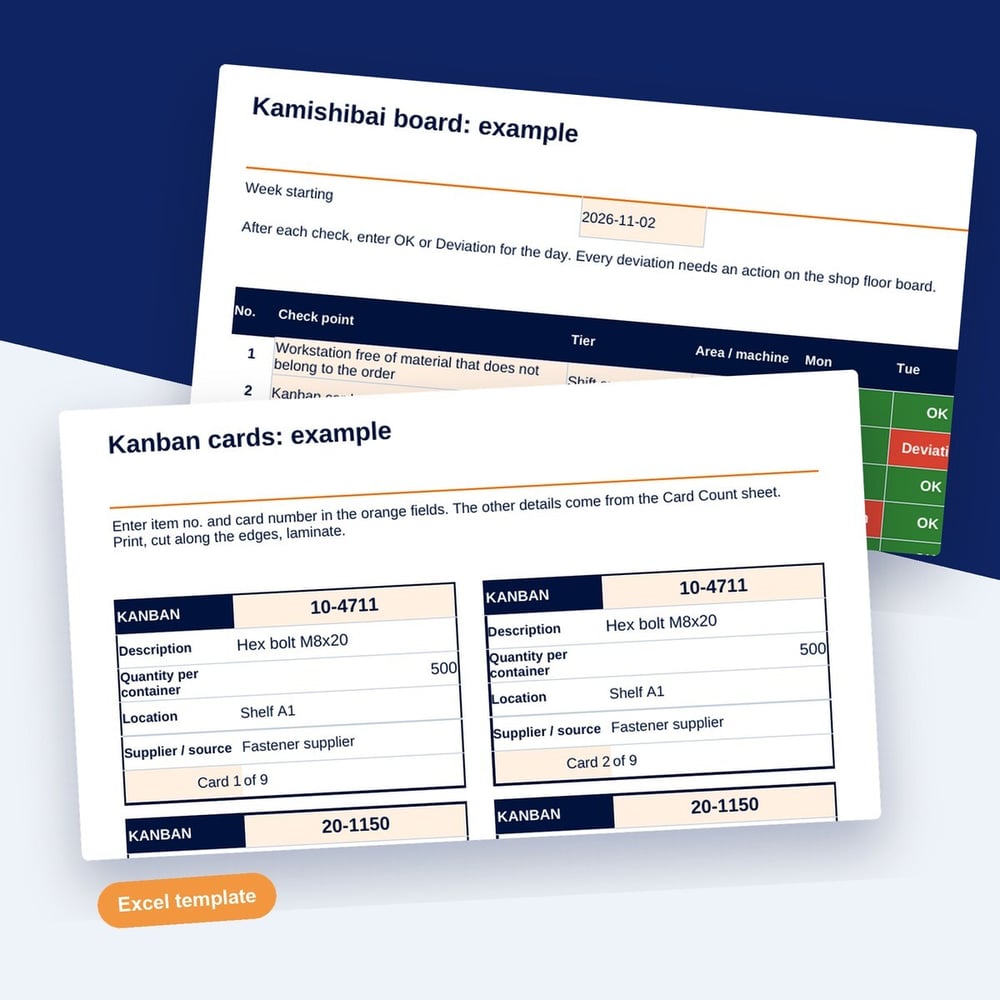
- Kanban cards to print, eight per A4 page, filled from the item list
- Kamishibai board with check points, tiers and a weekly view
- Kamishibai cards to print, plus filled-in examples
If you no longer want to piece together order status from the board: SYMESTIC, the cloud-native MES, takes orders from the ERP and shows status and current operation live. In a free 30-minute live demo, we show you SYMESTIC on your own use case.
Who it is for
Who the kanban card template is for
The template is for logistics planners, production managers and lean teams who want to introduce kanban for a few items or run regular checks with kamishibai cards. It suits a first loop between a supermarket and a line, before you extend kanban to more items.
How to work with the kanban card template
- 1
Calculate the cards
Enter demand per day, replenishment lead time, safety factor and container quantity. Excel sets at least two cards per item.
- 2
Print the cards
Enter item number and card number. The cards fill from the list; print, cut and laminate them.
- 3
Check with kamishibai
Set check points and tiers on the board and pull a card each day to check one point at the line.
What makes a kanban loop work
The card count follows demand
When demand or lead time changes, the number of cards has to change with it. Review the calculation at fixed intervals so the loop neither runs empty nor fills the stock.
Kanban needs a steady consumption
Items with a regular demand suit kanban well. For rare or highly variable items, an order based supply is usually the better choice.
Kamishibai checks the standard
A kamishibai card asks whether a defined standard is kept at the line. Deviations become visible early, and the person checking can fix them on the spot.
How to
How to calculate the number of kanban cards
The number of kanban cards for an item follows from four inputs: number of cards = demand per day × replenishment lead time in days × (1 + safety factor) ÷ quantity per container, rounded up to the next whole card. Each card stands for one full container in the loop between the supplying area and the line.
Replenishment lead time covers the whole loop: the time until an empty container is noticed, the way to the supplying area, waiting, production or picking, and the way back. First calculations often count only the production time and end up with too few cards. Follow one card through the loop and measure how long it takes before you use the formula.
A kanban card carries everything the supplier needs to refill without asking: item number and description, quantity per container, supplying and consuming location, container type and the card number, for example 3 of 7. The card number shows when a card goes missing, which is a frequent reason why a loop starts to run empty.
Example
Example: card count for a screw in assembly
An assembly line uses 1,800 screws a day from a supermarket. Sample values for the loop:
| Input | Value |
|---|---|
| Demand per day | 1,800 pieces |
| Replenishment lead time | 1.5 days |
| Safety factor | 20% |
| Quantity per container | 500 pieces |
| Calculation | 1,800 × 1.5 × 1.2 ÷ 500 = 6.48 |
| Number of cards | 7 |
Seven cards keep 3,500 screws in the loop, a little under two days of demand. If the lead time drops to one day, the same formula gives 4.32, rounded up to 5 cards, and two containers become free.
Questions and answers
Common questions about kanban cards
What are the two types of kanban cards?
Withdrawal kanban and production kanban. A withdrawal or transport kanban authorizes moving a container from the supermarket to the line. A production kanban authorizes the supplying process to make a container to replace what was taken. Small loops often use one card type for both purposes.
What are the six rules of kanban?
The rules from the Toyota Production System: the later process withdraws only what the card states, the earlier process produces only what was withdrawn, nothing is made or moved without a card, a card always travels with the parts, defective parts are never passed on, and the number of cards is reduced step by step to bring problems to the surface.
What is the difference between a kanban card and a kanban board?
In production, a kanban card is a signal that triggers the replenishment of material. A kanban board in office or software work shows tasks in columns such as to do, doing and done. Both come from the idea of pull, but a production card always stands for a physical quantity of parts.
What does a kanban card look like?
A typical card reads: item 40-1127, hex screw M8 × 20, 500 pieces per container, from supermarket aisle B3 to line 2 station 5, small load carrier, card 3 of 7. A barcode or QR code is optional and helps when cards are scanned at the supermarket.
What happens when a kanban card gets lost?
The loop holds one container less than calculated, and the risk of running empty rises without anyone noticing. Count the cards in each loop at a fixed interval, for example weekly, and compare them with the card numbers. Replace a lost card with the same number so the count stays complete.
Download the kanban card template
Fill in the short form and you receive the download right after.