



Contents
A human machine interface (HMI) is the part of a machine or control system through which an operator sees what the system is doing and tells it what to do. On a shop floor that can be a touchscreen on a press, a button panel on a conveyor or a display at a workstation.
The term covers the operator side only. The logic that moves the machine runs in a controller, usually a PLC. A manufacturing execution system (MES) places machine events in the context of orders and shifts. The three can share hardware, but they answer different questions, and each needs its own acceptance criteria.
HMI, PLC, SCADA and MES side by side
An acceptance test goes wrong when one screen is asked to prove things that belong to another layer. The table assigns each layer its own question and its own proof.
| Layer | Question it answers | Evidence to ask for |
|---|---|---|
| HMI | Can the operator understand the state and act on it? | Screen behavior, permissions and feedback after a command |
| PLC | Does the machine execute its control logic? | Control specification and verified machine behavior |
| SCADA | Can a team supervise several connected machines from one place? | Equipment overview, alarm handling, history |
| MES | Can production events be assigned to orders and shifts? | Event definitions and production records |
A familiar screen layout is therefore weak evidence for a safe or correct machine. The HSE guidance on control systems makes the point for process plants: the human interface is one element next to the logic and the plant interfaces, and a safety function depends on every element it needs. Where a safety function relies on an operator action, HSE counts the operator as part of the safety-related system. That raises the bar for what the screen must show at the moment of the action.
Types of HMI
An HMI in a plant takes one of three common forms, and each form needs its own acceptance check. The first is the operator panel at the machine, with buttons or a touchscreen. Inductive Automation, a SCADA vendor, describes modernized HMIs in which operators tap the screen instead of using buttons and switches, and it notes that mobile HMI is deployed through a web-based HMI or SCADA system or through an app. The same page describes the supervisory screen as the place where operators see graphs and dashboards, manage alarms and connect to SCADA, ERP and MES systems.
| Form | Where the operator uses it | What to test |
|---|---|---|
| Operator panel or touchscreen at the machine | Directly at the machine, with buttons or a touch display | Readability at the working distance, response to touch and the state shown after a command |
| Software HMI on a supervisory system | At a workstation or control room, across several machines | Alarm handling, the picture of each machine and the age of the displayed values |
| Mobile or web HMI | On a tablet or phone, in the plant or remotely | Login and permissions, the same state as the panel and behavior when the connection drops |
The forms can coexist on one machine. A press may carry a local panel, appear on a supervisory screen and be opened on a tablet by a shift lead. Test each form against the same machine states, so that all three show one answer.
What the guidance asks of an operator screen
The HSE page describes how alarms should reach the operator: within the field of view, in a consistent style, and with enough content to act on. Each alarm should show the condition, the affected plant, the required action, the priority, the time and the status. High-priority alarms must stay easy to find while many alarms are active.
Two ISA documents frame the same topic for process automation. The ISA-101 standards treat the HMI as a lifecycle subject that spans design, implementation, operation and continuous improvement, and the page states that the framework applies to continuous, batch and discrete industries. The ISA-18 series center on a documented alarm philosophy and cover the alarm lifecycle from identification and rationalization to change management; the same series also contains guidance for HMI design. Both address process automation systems. Which parts apply to a specific packaging line or machining cell is a question for the machine supplier and the responsible engineers.
A screen acceptance sheet for a packaging cell
Take a hypothetical packaging cell with a stopped conveyor. The display says "ready", yet the last value from the machine is old. Restarting the display does not explain the machine condition. The test has to separate a lost connection from a real ready state.
Run the sheet below as a controlled test agreed with the responsible engineers. Testing a display never involves defeating a guard or bypassing a protective function.
| Scenario | Evidence to collect | Pass condition to agree locally |
|---|---|---|
| A machine value stops updating | Source timestamp and connection state | The operator can identify stale data |
| The operator sends a permitted command | Request and controller response | Confirmed execution looks different from a submitted request |
| An alarm repeats | Active state and acknowledgement state | Acknowledging does not hide a condition that is still active |
| A shift changes during a stop | Event start and end, shift boundary | The reporting counts the stop duration once |
| A user without permission tries to change a setting | Permission rule and the attempted action | The setting stays controlled and the user sees why |
Put an owner and an observed result next to every row. Keep screenshots with the test record, but check the controller or event record as well, because a screenshot does not show that a command reached the machine.
Count the waiting time before calling it lost output
A worked example separates interface inconvenience from production loss. Assume an operator consults a screen 24 times per shift and each refresh takes 5 seconds. That is 24 × 5 s = 120 s, or 2 minutes of waiting. A revised screen that refreshes in 2 seconds brings the same 24 interactions down to 48 s. The difference is 72 s per shift.
Across three shifts and 21 production days, 72 s × 3 × 21 comes to 4,536 s, about 76 minutes of operator waiting per station and month. The inputs are illustrative, not a customer result.
Whether those 76 minutes cost output depends on the machine. If it keeps producing while the operator waits, the time is operator time and no output was lost. If the machine is stopped until the operator confirms something, check the event record before valuing the difference. Adding the same seconds to labor savings and to machine savings counts one effect twice.
Local operation and the production record
A machine HMI is organized around operating the machine. An MES view is organized around production questions, such as which order was running when a stop began. A shift report keeps the machine identifier, the event time, the order and the reason chosen by the responsible person.
That record supports a different conversation than an alarm screen does. The alarm tells the operator what needs attention now. The production record lets the team compare which stops consumed the most time across a shift. Neither record alone proves the root cause of a failure.
What SYMESTIC adds at the machine
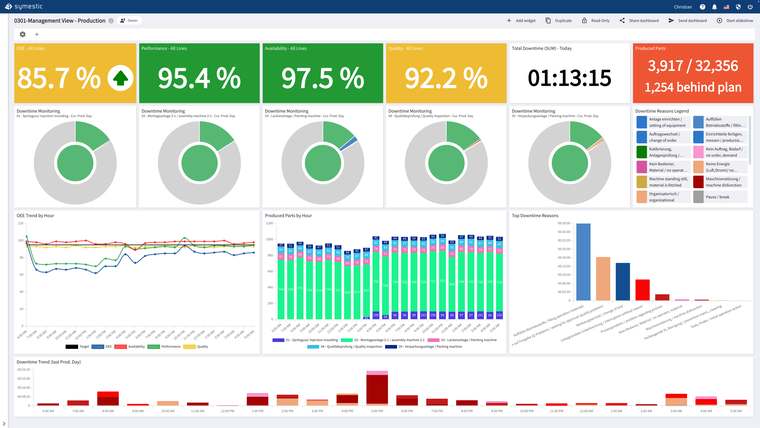
SYMESTIC reads machine data over OPC UA through the Cloud Gateway, free software that runs on your own server or computer. Digital signals come in through the IoT Box without intervention in the PLC. A stop is detected automatically: if the machine supplies a stop signal, SYMESTIC uses it; otherwise it detects the stop because no parts are counted any more. The operator selects the stop reason on a touch-optimized shop-floor client, and the number of clients is unlimited. Alerts go out by push or e-mail. The machine HMI remains the place to operate the machine, and SYMESTIC adds the production record around it.
More on the pages for downtime tracking and alarm management.
Prepare the interface review
Before selecting software, list the machines, the available signals and the decisions each role must make. For every displayed value, name its source, unit and update behavior. For every command, name who may issue it and what confirms the result.
Keep a separate list of open questions: whether an existing interface exposes the data you need, and whether the equipment supplier permits the access method you have in mind. Settle these before assuming that a dashboard can replace a machine control panel.
Sources
- HSE: Control systems
- ISA: ISA-101 standards, Human Machine Interfaces for Process Automation Systems
- ISA: ISA-18 series, Management of Alarm Systems for the Process Industries
- Inductive Automation: What is HMI?

A free live demo shows how machine states and stop reasons are recorded for your own machines: book 30 minutes with an expert.
See SYMESTIC on your own use case
In a free live demo, a product expert walks you through the running platform and shows what OEE, downtime and the connection of your machines and ERP look like in practice.
- Live OEE
- Downtime and reasons
- Connecting machines and ERP