



Contents
Process planning determines how a part is made: which operations turn the raw material into the finished part, in which order, on which machines, with which tools and fixtures, and how long each operation takes. The result is the process plan, also called a routing or operation sheet. NIST describes process planning as the link between design and production planning (NISTIR 7734).
In management the term also stands for planning business processes. This page covers manufacturing.
What a process plan contains
According to MIT course material, a process plan specifies the processes, their sequence and the equipment, and it can also cover material flow, inspection and documentation (MIT 2.008). In practice each operation has its own line:
| Field | Example | Used by |
|---|---|---|
| Operation number and description | 20 Turn both sides | operators, scheduling |
| Work center or machine | CNC lathe 2 | capacity planning |
| Tools and fixtures | turning insert, three-jaw chuck, tailstock | tool crib, setup |
| Setup time | 45 min per order | scheduling, costing |
| Time per part | 3.2 min | scheduling, costing, cycle time checks |
| Inspection | bearing seat 25 mm k6, every 20th part | quality |
| Raw stock | steel bar C45, 32 mm diameter | purchasing |
Steps of process planning
- Read the drawing and specification: material, geometry, tolerances, surface finish, quantity.
- Choose the raw stock, such as bar, casting, forging or sheet.
- Select a process for each feature: turning, milling, grinding, heat treatment.
- Sequence the operations. Datums come first, roughing before finishing, hardening before grinding.
- Assign machines, tools and fixtures.
- Set cutting parameters and calculate setup time and time per part.
- Define inspection: what is checked, where, how often and with which gauge.
- Release the plan and keep it current when tools, material or machines change.
Manual, variant and generative process planning
Computer-aided process planning (CAPP) emerged because skilled process planners were scarce and manufacturers wanted to automate more of their work. A 1983 report by the National Bureau of Standards, today NIST, described two approaches, variant and generative (Chang, NIST).
| Approach | How it works | Suited for |
|---|---|---|
| Manual | the planner writes the plan from experience and handbooks | low volumes, few part families |
| Variant | the system retrieves the plan of a similar part and the planner edits it | many similar parts |
| Generative | the system derives the plan from part features and rules | well-defined features and processes |
Example: process plan for a pump shaft
The numbers are invented for illustration. A pump shaft made of C45 steel has two ground bearing seats and a keyway.
| Op | Operation | Machine | Setup (min) | Time per part (min) |
|---|---|---|---|---|
| 10 | Saw bar to length | band saw | 10 | 0.8 |
| 20 | Turn both sides | CNC lathe | 45 | 3.2 |
| 30 | Mill keyway | machining center | 30 | 1.5 |
| 40 | Harden bearing seats | induction hardening | 20 | 0.6 |
| 50 | Grind bearing seats | cylindrical grinder | 40 | 2.5 |
| Total | 145 | 8.6 |
The time for an order is setup plus quantity times time per part. For 50 shafts that is 145 + 50 × 8.6 = 575 minutes, or 11.5 minutes per shaft, and setup takes a quarter of it. For 500 shafts it is 4,445 minutes, or 8.9 minutes per shaft, with a setup share of 3 percent.
A plan that suits 500 parts may not be the best one for 50. With small lots it can pay to mill the keyway on a lathe with driven tools and save one setup, even if the time per part rises.
Process planning, production planning and scheduling
| Task | Question | Result | Changes |
|---|---|---|---|
| Process planning | How is the part made? | process plan or routing | when design, tools or machines change |
| Production planning | How much is made, when, with which capacity? | production and capacity plan | weekly to monthly |
| Scheduling | Which order runs on which machine at what time? | sequence and schedule | daily, shift by shift |
The process plan feeds both of the others. How quantities and capacity are planned is covered on the production plan page, and the sequencing of orders on the page on production scheduling.
Checking the plan against the shop floor
Setup times and times per part come from time studies, experience or the CAM system, and only the shop floor shows whether they hold. If operation 50 needs 3.4 minutes per shaft instead of 2.5, an order of 50 takes 45 minutes longer and an order of 500 takes 450 minutes longer. Every schedule built on the plan is then late.
- Setup time per operation, planned against actual.
- Cycle time per machine, planned against actual.
- Scrap and rework per operation. Rework adds operations that are not in the plan.
- Downtime at the machine that carries the critical operation.
Process planning with SYMESTIC
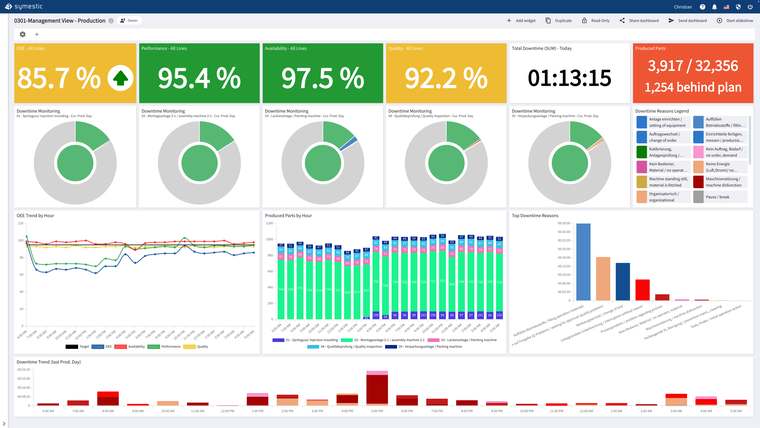
The process plan itself is usually maintained in the ERP or CAPP system. Orders are imported from the ERP or created directly in SYMESTIC, and SYMESTIC shows the status and current operation of each order live. The cycle time is displayed, setup is recorded as a downtime reason of its own, and quantities, scrap and downtime are captured automatically. Comparing these actual values with the times in the process plan shows where the plan no longer holds.
More on the pages on production control and changeover time reduction.
Sources
- NIST: A Machining and Measurement Process Planning Activity Model, NISTIR 7734, May 2010
- NIST: The Advances of Computer-Aided Process Planning, Chang, NISTIR 441, 1983
- MIT: 2.008 Process Planning, CAD/CAM and DFM, lecture slides

A free live demo based on your own use case shows how order status, current operations and cycle times are tracked live.
See SYMESTIC on your own use case
In a free live demo, a product expert walks you through the running platform and shows what OEE, downtime and the connection of your machines and ERP look like in practice.
- Live OEE
- Downtime and reasons
- Connecting machines and ERP