



Contents
MRP II (manufacturing resource planning) is the development of material requirements planning that adds resource loading and shop-floor feedback to the material plan. Because progress reports from the shop floor flow back into every planning run, the University of Cambridge Institute for Manufacturing notes that MRP II is sometimes called closed-loop MRP. Fuller MRP II software adds rough-cut capacity planning, sales order processing, stock records and cost accounting, so a full implementation can act as an integrated database for the company.
Like MRP, it starts from the master production schedule and the bills of materials and runs explosion, netting and offsetting to produce the initial schedule. Cambridge also names the weakness: capacity is checked only after the MRP schedule is prepared. Its page on finite capacity scheduling therefore describes MRP II as infinite capacity scheduling, which schedules from the customer's order due date.
MRP, MRP II and ERP
| System | Scope | Source |
|---|---|---|
| MRP (material requirements planning) | Uses bills of materials, a master schedule and inventory records to calculate net material requirements | Oracle MRP glossary |
| MRP II (manufacturing resource planning) | Adds shop-floor feedback (closed loop), loading by resource, batching rules and extensions such as rough-cut capacity planning, sales orders, stock records and cost accounting | Cambridge IfM |
| ERP (enterprise resource planning) | Supports planning, procuring, making and delivering products, and may cover finance, human resources and sales; many ERP systems developed from MRP II systems | NIST overview of ERP |
The ERP row follows a NIST overview of ERP systems in manufacturing from around 2000. In practice the borders are blurred. The NIST authors note that, because many ERP systems grew out of MRP II, there is no agreement on where the boundaries of manufacturing management lie.
Keep the Planning Layers Distinct
The master production schedule specifies product quantities over time. Material planning derives component requirements from those quantities. Resource checks examine whether the required work fits the available capacity. Feedback connects actual progress and changes to the next planning decision.
| Planning Layer | Question | Example Information |
|---|---|---|
| Product plan | What output is needed and when? | Finished assemblies by period |
| Material requirements | Which components are needed? | Bills of materials, usable stock and receipts |
| Resource check | Can the work be performed in time? | Operation requirements and usable calendars |
| Feedback | What has changed? | Actual output, shortages and revised completion expectations |
An implementation can spread these layers across several applications. Before you trust a status, check which application holds the data for each layer and how often it is updated.
Calculate Material and Capacity Separately
Example: the product plan calls for 200 assemblies, and each assembly needs three brackets. Gross bracket demand is 200 × 3 = 600. There are 90 usable brackets in stock and a confirmed receipt of 60 that arrives before they are needed. Assembly needs 12 minutes per unit at a constrained resource with 35 usable hours in the period.
| Check | Required | Available | Gap |
|---|---|---|---|
| Brackets | 600 | 90 in stock + 60 on order = 150 | 450 to order |
| Assembly hours | 200 × 12 min = 2,400 min = 40 h | 35 h | 5 h short |
The material calculation can be correct while the plan has a five-hour capacity gap. A late receipt or blocked stock would change the bracket result: a purchase order for 60 brackets does not count as available if it arrives after the production need.
The two checks need different remedies. Buying more brackets does not create assembly hours, and adding hours does not make a late component arrive. Keep the shortage and the capacity gap visible as two separate findings.
Use Feedback to Revise the Right Assumption
Suppose production completes only 160 assemblies. Before moving the remaining 40 into the next period, find out why. The capacity assumption, material availability or an authorized priority change each need a different response.
Variant: the resource actually needs 15 minutes per assembly instead of 12. Producing the original 200 then needs 50 hours, 10 more than the 40-hour estimate and 15 more than the 35 available. Carrying the unfinished quantity forward without correcting the time standard creates a continuing overload, period after period.
If the difference came from one exceptional interruption, changing the standard time would instead hide the cause. The feedback should separate processing time from an interruption recorded on its own and keep the conditions of the measurement.
Return Actual Production Information to Planning
Define what each returned quantity means: started, completed, accepted or available. Returning started assemblies as usable finished stock gives the next planning run a wrong opening balance.
The feedback also needs a stable reference to the order, operation and reporting period. A later correction should remain identifiable; otherwise a planner sees a revised number without knowing whether production changed or the record was corrected.
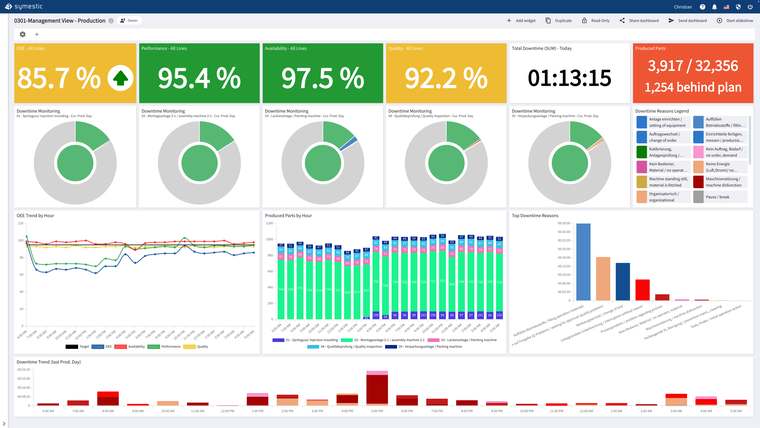
SYMESTIC, a cloud MES, can take orders from the ERP and report back to it. Completed quantities and stops are recorded per order and machine, which gives the feedback layer measured figures. The process plan defines how each operation is intended to run, and the 12 minutes in the example come from there.
Sources
- University of Cambridge IfM: MRP II
- University of Cambridge IfM: Finite Capacity Scheduling
- Oracle Master Scheduling/MRP: Glossary
- NIST (Algeo and Barkmeyer, c. 2000): An Overview of Enterprise Resource Planning Systems in Manufacturing Enterprises

See how completed quantities and stops are recorded per order and machine, the figures production reports back to planning, in a free 30-minute live demo using your own application.
See SYMESTIC on your own use case
In a free live demo, a product expert walks you through the running platform and shows what OEE, downtime and the connection of your machines and ERP look like in practice.
- Live OEE
- Downtime and reasons
- Connecting machines and ERP