



Contents
Resource management in manufacturing assigns the available machines, people, tools and materials to the work that needs them, at the time it is needed. A NIST overview of ERP systems in manufacturing (Algeo and Barkmeyer) names the assignment of resources to specific work items as the one concern that is clearly unique to manufacturing management. Manufacturing resource planning covers the planning system around that task; see MRP II. This page covers the shift-level question: who and what is actually available for the next job.
Four Levels of the Same Question
Resource questions are asked at several planning levels, with more detail and a shorter horizon at each step.
| Level | Question | Source of the Definition |
|---|---|---|
| Rough-cut capacity planning | Can the key resources carry the master schedule? | Oracle MRP glossary |
| Capacity requirements planning | Does the required capacity fit the available capacity, period by period, based on the material plan? | Oracle MRP glossary |
| Finite capacity scheduling | Which job runs on which resource and when, given what is available? | Cambridge IfM |
| Shift allocation | Who runs which machine today, with which fixture and material? | This page |
The first two levels compare totals. The University of Cambridge Institute for Manufacturing describes the third as a schedule built on the capacity that is actually available. The fourth level is where a plan that fits on paper meets the people and fixtures on the shift.
Describe Availability for the Task
A resource is not available merely because it exists. A machine can require maintenance, an operator can lack a qualification, and a fixture can be committed to another order. The resource record needs the restrictions that affect its intended use.
| Resource | Availability to Check | Allocation Error |
|---|---|---|
| Machine | Usable calendar and process capability | A free machine cannot perform the required operation |
| Operator | Calendar and required qualification | Two tasks need the same person simultaneously |
| Tool or fixture | Location, release and condition | The plan assumes an unavailable fixture |
| Material | Usable quantity and required release | Reserved or blocked stock is counted as free |
Start with the resource that can actually stop the next job and add detail only where it changes the decision. In the example below that resource is one operator.
A Shared Operator Can Limit Two Machines
Example: two machines each have 420 usable minutes in a shift. Planned work needs 300 minutes on machine A and 280 on machine B, so neither machine is overloaded: their load is 300 / 420 = 71.4 percent and 280 / 420 = 66.7 percent.
One operator, however, must attend machine A for 180 minutes and machine B for 200, and also needs 70 minutes for a required preparation task.
| Resource | Calendar (min) | Planned Demand (min) | Load |
|---|---|---|---|
| Machine A | 420 | 300 | 71.4% |
| Machine B | 420 | 280 | 66.7% |
| Operator | 420 | 180 + 200 + 70 = 450 | 107.1% |
The operator's 450 minutes exceed the 420-minute calendar by 30 minutes. The machine plan is feasible and the shift plan is not.
Variant: a second qualified person takes over the 70-minute preparation. The operator's demand drops to 380 minutes, 90.5 percent of the calendar. That total is only a first check. If both machines need the operator at the same moment, for example for two setups, 380 minutes can still be impossible. The timing and the permitted unattended running time need a second check.
Possible changes include separating the setup starts, assigning another qualified person or moving the preparation work. Each option must keep the process and safety requirements. Setting operator attendance to zero to make the plan fit changes the operating assumption and leaves the shortage in place.
A Second Meaning of the Term
Resource management can also mean resource efficiency: the material and energy consumed per unit of output. The VDI ZRE management guide (2019) treats it across the whole process chain; moving work to another route can change both delivery and material use.
Use Actual Production Data to Review the Allocation
Compare planned and observed durations at the same boundary. Setup time, processing time and waiting should remain distinguishable. If waiting for a tool is included in a processing-time average, the next plan treats the delay as an unavoidable machine requirement.
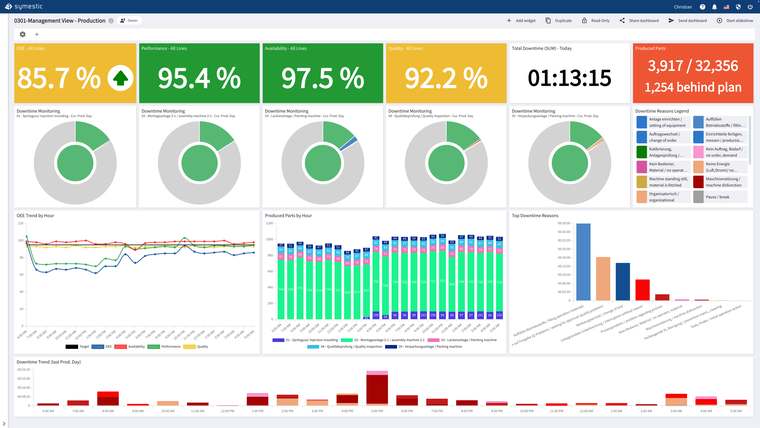
Record the cause at the point where it can still be identified. "Not producing" does not reveal whether the machine is waiting for an operator, material or a downstream process, and the reason decides which resource allocation should change. SYMESTIC, a cloud MES, records stops with their reasons per machine and compares shifts, so a recurring "waiting for operator" stop on machine B becomes visible.
Review exceptions after the shift. A priority change may have been the right call while invalidating the original completion times. Keeping the decision and its consequences separates a poor estimate from an intentional reallocation. For weeks and months ahead, use capacity planning; the operations that resources are assigned to are defined in process planning.
Sources
- NIST (Algeo and Barkmeyer, c. 2000): An Overview of Enterprise Resource Planning Systems in Manufacturing Enterprises
- Oracle Master Scheduling/MRP: Glossary
- University of Cambridge IfM: Finite Capacity Scheduling
- VDI ZRE: The Easy Way to Resource Efficiency, 2019

See recorded stop reasons per machine, for example waiting for an operator or for material, in a free 30-minute live demo using your own application.
See SYMESTIC on your own use case
In a free live demo, a product expert walks you through the running platform and shows what OEE, downtime and the connection of your machines and ERP look like in practice.
- Live OEE
- Downtime and reasons
- Connecting machines and ERP